
Start with five simple questions
A beautiful overview is useful only if it helps you understand something you need to act on. Before a demo, write down the decisions your practice is currently making from memory, delayed exports or contradictory numbers. They are a better starting point tha vendor’s feature count.
- Which clinicians have openings that fit the clients contacting us?
- Why did one clinician complete fewer sessions?
- Are fewer clients starting, or are more leaving?
- Did revenue change because of session numbers, session prices or payments arriving later?
- What will we do next, who will do it, and when will we check the result?
Which tools should you compare?
Cortexa Analytics
Goals, clinician reporting, intake and plain-language questions. Ask the demo to explain a change in your practice.
PracticeVital
Practice reporting with more listed EHR connections. Check compatibility, then compare coverage and price.
Your EHR
Start with the appointment, billing and payment reports you already have. Check whether they answer your weekly questions.
A spreadsheet or calculator
Useful for a budget or “what if?” question. Decide who will keep the numbers current.
Why we recommend starting with Cortexa
Cortexa includes goals for the practice and its clinicians, alongside reports showing sessions, availability, caseloads, returning clients and revenue. That connects the targets you set with what is actually happening. Goals are part of the standalone Analytics subscription.
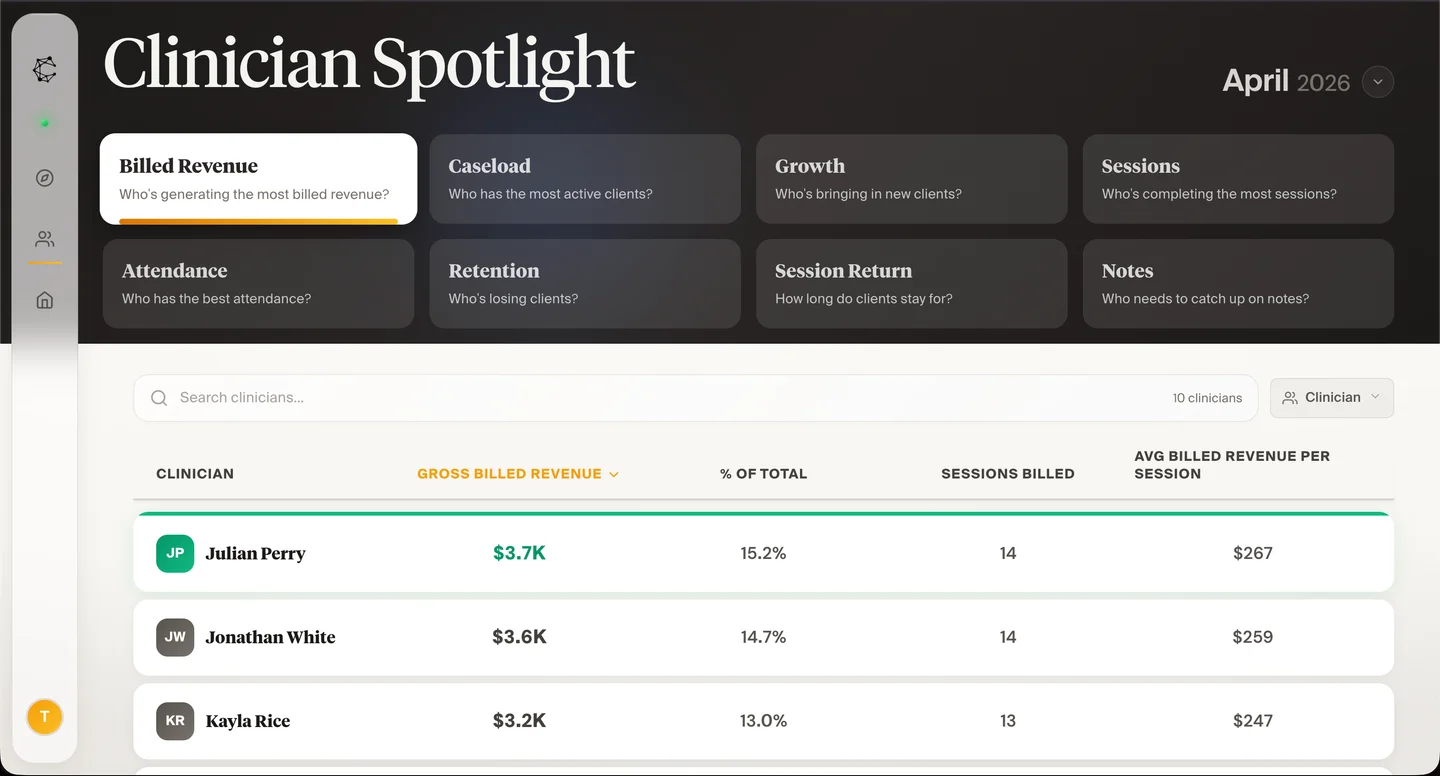
The design helps you see related information together. Cortexa’s caseload screen places the total beside clients joining, returning, transferring or becoming inactive. Clinician Spotlight helps you review the team’s sessions, attendance and other measures without rebuilding the same report for each person.
Cortexa also includes the ability to ask questions about your data and a view of inquiries, consultations and progress toward care. Those extend the questions you can bring to the product beyond “how many sessions happened?” If the next finding exposes an administrative gap, Full Service Partner provides a route to help with the underlying work. Analytics and administrative services are separate choices.
That combination is why we recommend starting with a Cortexa walkthrough. Use it to test the actual questions on your list, including where a definition or missing data could change the answer.
When PracticeVital’s EHR coverage matters
PracticeVital offers goals and reporting for therapy groups. Cortexa offers those capabilities too. The clearest reason to consider PracticeVital is its wider EHR list, which also names Jane, PracticeQ, TherapyAppointment and Healthie.
If both products support your EHR, compare the actual screens and subscription price. Check how each helps you understand a clinician’s progress, a changing caseload and the path from an inquiry to care.
For the prices, feature comparison and connection details, read Cortexa vs. PracticeVital.
Check the reports you already have
Before adding a tool, inspect the reporting you already pay for. SimplePractice’s Analytics dashboard includes income, claim, appointment and note views. Jane’s reporting offer also includes practice reporting and analytics.
Use the report that answers the question. Your biller may need a claim-status report to fix a rejected claim. You may need several views together to understand why a clinician has openings. Keep the original report for detail, and add analytics when it makes the bigger picture easier to understand.
If nobody is following up on denied claims, the practice needs someone to do that work. Explore billing support as well as the reports.
Five checks for a useful demo
Use the same five checks in each demo. Focus on what your practice needs to do every week.
Answers your questions
Bring five real practice questions. Ask to see the answers, not just the charts.
Easy to understand
You should understand the labels, dates and next step without a long explanation.
Numbers you can check
Compare a total with the original records. Ask about anything missing.
Works for your team
Have the person who will use it try a routine task.
A clear total price
Include the subscription, setup, extra services and work your team still handles.
Try a real weekly review
Use a complete period and choose one hypothetical administrative issue: a clinician with open capacity, a drop in returning clients, or revenue that moved differently from sessions. Ask the dashboard to help the team explain the change. Distinguish a signal to investigate from a conclusion about a clinician’s performance.
At the end, write a short action: investigate a scheduling mismatch, review referral fit, check a revenue definition, or assign intake follow-up. If the team cannot say what it learned or what it will do, the problem may be the view, the definition or the weekly routine. Solve that before adding more metrics.
For a one-off decision, our practice calculators let you explore inputs without committing to a reporting system. For recurring leadership work, a dashboard earns its place by becoming part of the routine.
Common questions
What is the best dashboard for a small therapy group?
Start with the reporting decisions you make every week. Cortexa Analytics is a $50-per-month option for a clearer practice and clinician view. If your EHR already answers those questions and your workflow is simple, you may not need an additional subscription yet.
Should I choose the product with the most metrics?
No. Choose enough coverage to answer important questions, with clear definitions and a usable route to detail. A large list of metrics can still leave the owner unable to explain why something changed.
Does a higher client return rate mean better care?
Not by itself. Clients may finish treatment as planned, change preferences or need a different kind of care. A return rate helps you decide what to investigate; it does not grade the quality of treatment.
Do I need to replace my EHR?
Usually the analytics decision can be evaluated separately. Confirm your data connection and reporting needs before considering an EHR migration, which affects a much broader clinical and administrative workflow.