
What each subscription gives you
Both products help independent therapy practices understand their business. Both offer goals and reports about the practice and its clinicians. The reason to choose Cortexa is the combination of price, useful coverage and a dashboard designed to help you understand what to do next.
PracticeVital includes clinician goals, sessions, attendance, returning clients, revenue and overdue notes. Those are useful capabilities. They do not make goals or clinician reporting a reason to choose PracticeVital over Cortexa.
| What you get | Cortexa Analytics | PracticeVital |
|---|---|---|
| Monthly price | $50 | $399 for 16–30 clinicians |
| Goals | Practice and clinician goals | Clinician session goals |
| Practice reporting | Sessions, revenue, attendance and caseloads | Sessions, revenue, attendance and caseloads |
| Client movement | New, returning, transferred and inactive clients | Active caseloads, rebooking and retention |
| Notes | Completion and outstanding notes | Overdue notes by clinician |
| Before the first session | Inquiries and consultations | Incoming leads need a separate CRM |
| Explore your data | Dashboards and plain-language questions | Dashboards, filters and historical views |
| EHR connections | Four listed connections | Eight listed connections |
What the price difference means
For a practice with 16–30 clinicians, Cortexa costs $349 less per month than PracticeVital. Over 12 monthly payments, that leaves $4,188 more per year with your practice.
PracticeVital’s smaller plan is $249/month for 5–15 clinicians. Cortexa is $50/month, a difference of $199.
A lower price is useful when the product also does the work you need. Cortexa includes goals, practice and clinician reporting, caseload insight and the ability to explore your data. The decision is whether PracticeVital offers something your practice needs enough to justify the higher subscription.
The clearest reason may be a connection to an EHR Cortexa does not currently support. If both products work with your system, compare the actual dashboard and the questions it answers. Goals alone do not explain the extra cost: Cortexa has them too.
Set goals and see what is getting in the way
Cortexa supports goals at the practice and clinician level, with progress tracking. That lets an owner review the target alongside what is happening in the practice. A goal is more useful when you can also see why someone is ahead of it or behind it.
For example, a clinician may be below their agreed session target because they have few inquiries, because the available appointments do not fit those inquiries, or because booked sessions are being cancelled. Those situations call for different help. Looking at goals alongside availability, caseloads and attendance makes the conversation more useful.
Set goals that reflect the clinician’s working hours, supervision duties, leave and stage of building a caseload. Use the numbers to decide what support is needed. A session target does not tell you whether treatment should continue or whether the care is effective.
PracticeVital also offers goals. Our case for Cortexa is that goals belong within a broader, affordable view of the practice. They are part of the Analytics subscription, without requiring Full Service Partner.
A dashboard that helps you understand the change
Cortexa puts related information together so you can follow a question through the practice. Start with the whole group, then look at the clinician, caseload or part of the intake process behind a change. You should be able to use the report in a conversation without building another spreadsheet first.
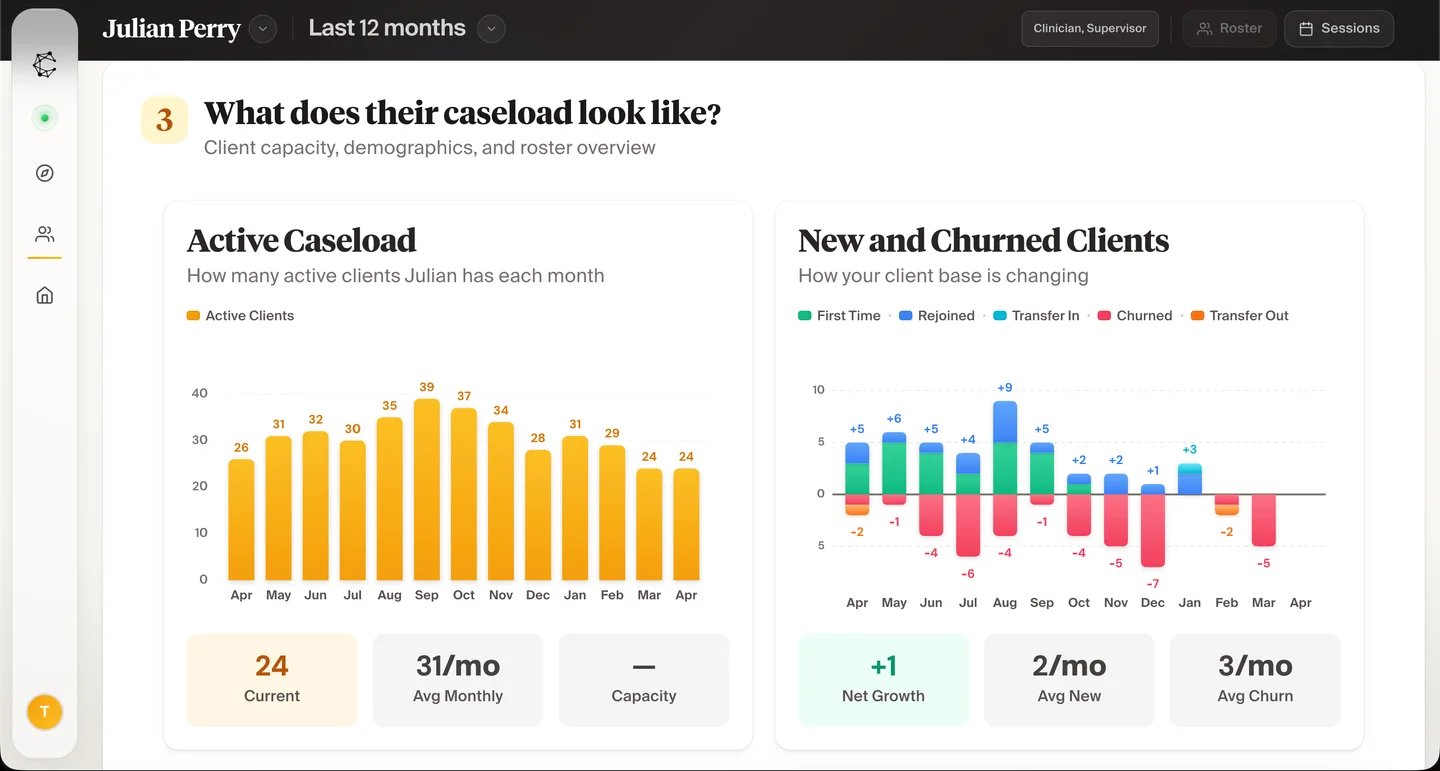
The caseload view shows active clients alongside new clients, people returning after a break, transfers and people who are no longer active. A falling caseload can mean several things. Seeing those movements together helps you distinguish a transfer between clinicians from a broader drop in returning clients.
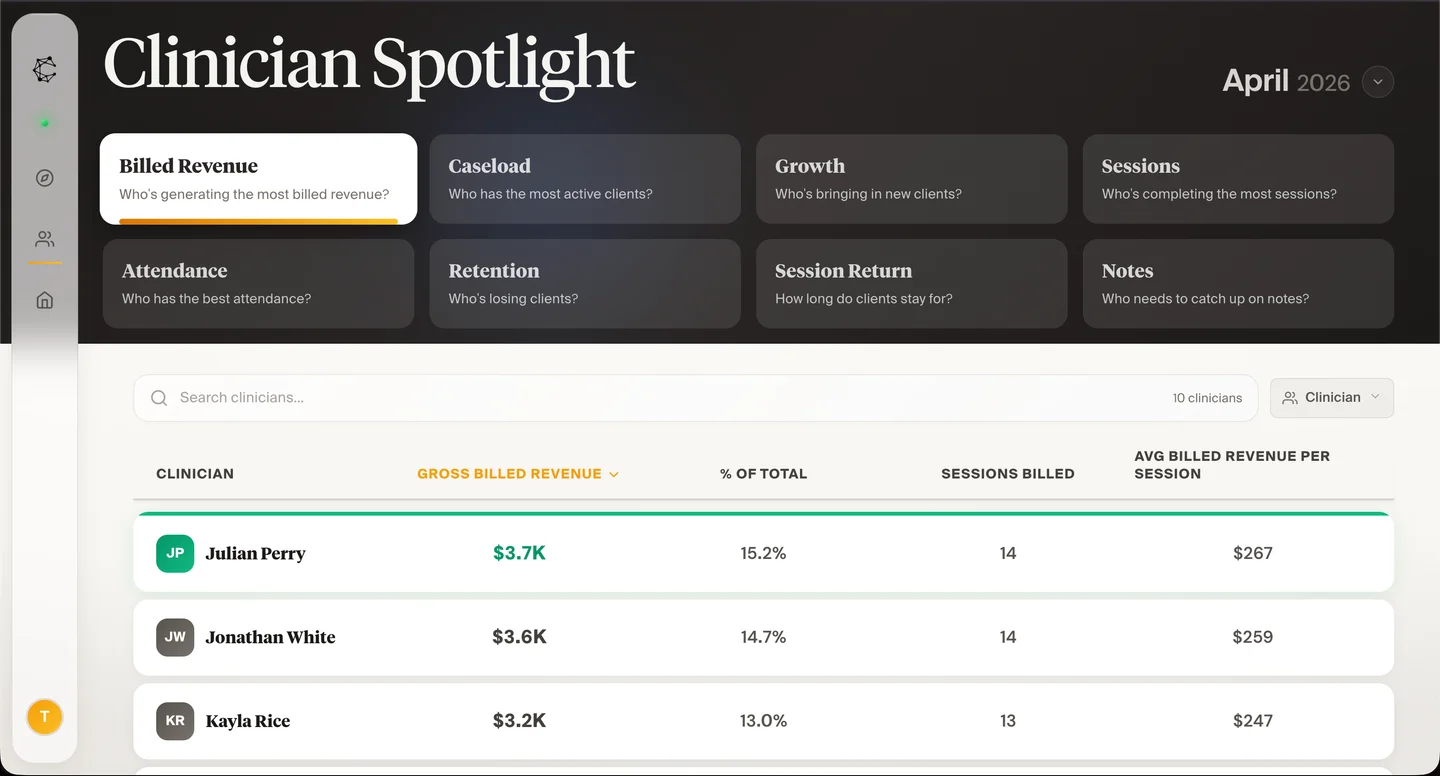
Clinician Spotlight brings sessions, attendance, caseload and other measures into a team view. The revenue view shows what was billed and the average billed per session. Clear labels matter here: the amount billed is different from the money already received.
This is the design standard behind Cortexa: readable numbers, related views and enough context to decide where to look next. The screen below shows how that works. You can explore more of the dashboard before booking a conversation.
Follow the path from the first inquiry to care
A practice needs to understand what happens before the first appointment as well as after it. If clinicians have openings, the next question is whether suitable people are finding the practice, getting a reply and reaching a first session.
Cortexa includes a view of inquiries and consultations as people move toward care. Together with clinician availability and caseload reporting, that helps you connect an empty schedule with the part of the intake process that needs attention.
PracticeVital focuses on activity after clients enter a practice. Incoming leads are handled in a separate customer relationship management system, or CRM. That is a meaningful difference for an owner trying to see the whole path in their practice reporting.
Cortexa also lets you ask questions about your data. You can start with a practical question, such as which clinicians have room for appointments, and explore the relevant information. You do not need to begin by designing a spreadsheet or knowing the name of every report.
PracticeVital’s advantage: a wider EHR list
Your electronic health record system, or EHR, holds the appointments and records behind your reports. A dashboard needs a working connection to that system. This is the first compatibility check to make before choosing either product.
Cortexa connects with SimplePractice, TherapyNotes, TheraNest and Sessions Health. PracticeVital supports all four and also lists Jane, PracticeQ, TherapyAppointment and Healthie.
Listed by both products
SimplePractice, TherapyNotes, TheraNest and Sessions Health.
Additional PracticeVital connections
Jane, PracticeQ, TherapyAppointment and Healthie. Confirm Cortexa support if you use one of these.
Add a team when you want the work handled
You can buy Cortexa Analytics on its own for $50 per month. Your existing team can use the reporting and goals to run the practice. You do not have to outsource administration to benefit from Cortexa.
If you also want help with the work, Full Service Partner adds front desk, intake, scheduling, billing, payroll and growth support. Analytics is included in that separately priced membership. You choose the support around your practice’s needs.
For example, seeing unanswered inquiries is one job. Replying, matching a suitable clinician, coordinating an appointment and following up are additional jobs. Cortexa can help with both the view and the follow-through when you choose the membership.
PracticeVital provides software onboarding, product support and educational resources. Those help your team use its analytics. They are different from having a partner answer the practice’s inquiries, work on unpaid claims or run payroll. That additional service option is another reason Cortexa can remain useful as the practice grows.
Our recommendation for an independent practice
Choose Cortexa when your EHR is supported and you want a clear, useful view of the practice at a much lower monthly price. Goals, clinician reporting, caseload context, intake visibility and questions about your data are part of the case for Analytics itself.
Consider PracticeVital when its additional EHR connections solve a compatibility problem for your practice. That is a concrete reason to pay for it. Shared features such as goals and clinician reports should be compared directly, rather than treated as a PracticeVital advantage.
In a Cortexa demo, bring the name of your EHR and a question that currently takes too long to answer. We can show the relevant screens, walk through goals and explain the connection. If you also need administrative help, we can discuss Full Service Partner separately.
Common questions
Does Cortexa have goals, or is that a PracticeVital feature?
Cortexa has goals for the practice and individual clinicians, with progress tracking. PracticeVital also offers goals. Goal setting is available in both products and is included in Cortexa Analytics.
How much less does Cortexa cost?
For 16–30 clinicians, Cortexa Analytics is $50 per month and PracticeVital is $399: a difference of $349 each month. For 5–15 clinicians, PracticeVital is $249 and the difference is $199. These comparisons use monthly subscriptions; annual discounts and larger-practice quotes differ.
What does PracticeVital offer that could make it the better fit?
Its wider published EHR list is the clearest reason. PracticeVital lists Jane, PracticeQ, TherapyAppointment and Healthie in addition to the four systems named by Cortexa. If Cortexa cannot connect to the EHR you want to keep, PracticeVital may be the practical choice.
Does the $50 subscription include billing or front desk staff?
The $50 subscription is for Cortexa Analytics. Front desk, intake, billing, payroll and growth support are available through the separately priced Full Service Partner membership, which includes Analytics.
Do I need to change my EHR to move from PracticeVital to Cortexa?
For a supported connection, Cortexa works alongside your existing EHR. Discuss your system and the reports you rely on during setup so your team can compare the same periods and understand any differences in how a number is counted.